
Vintage wedding photographs are among the most treasured heirlooms in any family collection. They capture the formal beginning of a generational lineage: a grandmother’s intricate lace veil, a grandfather’s sharp wartime uniform or classic tuxedo, and the joyful faces of extended relatives gathered decades ago. Unfortunately, because wedding photographs were frequently displayed in decorative glass frames on sunlit mantelpieces, they are especially vulnerable to severe ultraviolet light bleaching, yellowed silver oxidation, and accidental liquid spills.
When parents or grandparents celebrate a milestone anniversary, surprising them with a restored, colorized, high-resolution enlargement of their wedding day portrait is an emotionally unforgettable gift. Below is the comprehensive guide to restoring vintage wedding photographs using AI technology, preserving delicate bridal gown textures, restoring facial expressions, and adding realistic period-accurate color.
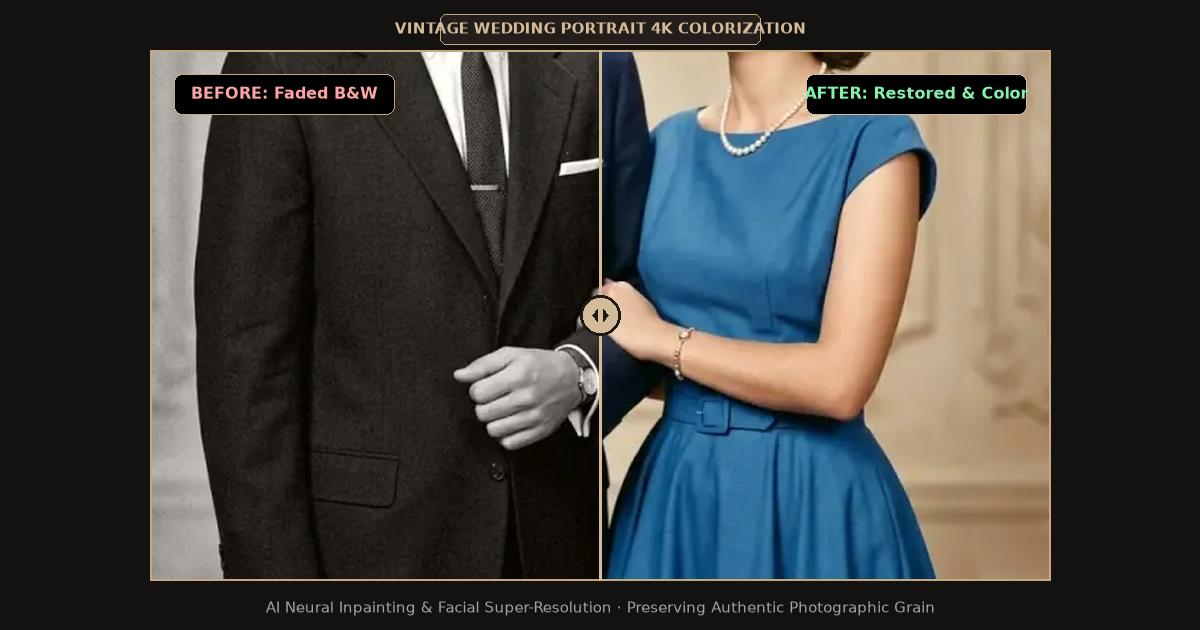
Split-screen comparison showing vintage monochrome wedding portrait restored and naturally colorized in 4K resolution.
The Common Challenges of Restoring Vintage Wedding Photos
Wedding photographs possess unique technical qualities that make generic photo editing filters fail:
- Highlight Blowout on White Bridal Gowns: In vintage prints, white satin dresses and delicate lace veils occupy the highest luminance values of the histogram. Inexperienced retouchers who push global contrast sliders immediately blow out highlight details, turning intricate lace embroidery into solid chalky white patches.
- Crushed Tuxedo Shadow Details: Conversely, a groom’s dark wool tuxedo occupies the deepest shadow zone. Without neural dynamic range expansion, brightening the suit introduces harsh digital noise and flat grayish banding.
- Severe UV Fading from Sunlit Frames: Because wedding photos were often framed behind non-UV glass, daylight steadily oxidizes photographic silver, leaving brides and grooms looking like pale, washed-out silhouettes.
Comparison: Traditional Manual Studio vs. Online AI Wedding Restoration
| Feature / Dimension | Traditional Photo Restoration Studio | Photoshop Manual Freelancer | FreePhotoRestoration AI |
|---|---|---|---|
| Cost Per Photo | $50 to $150 per print | $35 to $80 per photo | Free daily trial credits / Low-cost HD |
| Turnaround Time | 1 to 2 weeks | 3 to 7 business days | Under 15 seconds |
| Bridal Lace Detail Preservation | Manual airbrushing (can look painted) | Layer mask dodging and burning | Neural texture preservation (keeps thread grain) |
| Colorization Accuracy | Subjective hand tinting | Selective solid color fills | Neural skin-tone and bouquet color modeling |
| Output Resolution | Limited to original scan size | Dependent on artist resolution | Automated 4K Ultra HD (4096px) Upscaling |
Step-by-Step Guide: Restoring Vintage Wedding Pictures
Follow this tested process to restore wedding portraits for anniversary albums, canvas prints, or digital family archives:
1. Digitize with Gentle Handling
- If the photograph is framed behind glass and appears stuck to the glass surface, never pry it off. Doing so will rip the delicate gelatin emulsion right off the paper base. Instead, scan the photograph through the glass or take a high-resolution, glare-free digital photograph using indirect natural daylight.
- If the print is loose, place it on a clean flatbed scanner and scan at 600 DPI to 1200 DPI in 24-bit RGB Color.
2. Upload to the Online Restoration Workspace
Navigate to the FreePhotoRestoration Free Online Tool and upload your wedding scan:
- Select the Portrait Enhancement and Inpainting pipeline.
- The vision system analyzes structural semantics: isolating faces, bride veils, flower bouquets, and background church or studio scenery.
3. Neural Highlight and Shadow Rebalancing
The AI model executes coordinated restorative passes:
- Veil and Lace Texture Synthesis: The engine recalibrates highlight exposure curves, recovering delicate floral embroidery, tulle textures, and pearl beadwork in the wedding dress without washing out skin tones.
- Tuxedo and Shadow Deepening: Anchors true black points in the groom’s lapels and bowtie, creating rich three-dimensional depth and crisp separation from the background.
- Facial Detail Enhancement: Neural landmark models eliminate motion blur and lens softness, reconstructing iris catchlights, natural smiles, and subtle skin texture.
4. Optional Historical Colorization
Bring black-and-white wedding portraits to life by selecting the Smart Colorization module:
- The AI references historical textile databases to apply natural creamy ivories to wedding gowns, realistic botanical greens and floral tones to bouquets, and warm, lifelike skin tones to the bride and groom.
5. Export and Print in 4K Ultra HD
Download your finished wedding master in 4K Ultra HD (4096px). The high pixel density ensures that when you order an 11x14 or 16x20 anniversary canvas print, the picture remains razor-sharp from across the room.
Preserving Wedding Heirlooms for Future Generations
Store the original physical wedding photograph in an acid-free archival storage box or archival polyester folder. Keep the print away from direct sunlight, attics, and basements. For digital backups, save copies across multiple cloud storage platforms and share high-resolution files with family members.
Related Guides and Reading
- Antique Family Photo Restoration: Preserving 19th & Early 20th Century Heirlooms — Archival restoration of Victorian and Edwardian family photos.
- How to Colorize Old Black and White Photos with AI — Deep dive into neural palette selection and historical color accuracy.
- Unblur Face in Old Photos: AI Facial Reconstruction Guide — Bringing sharp focus to vintage ancestor portraits.
- Photo Restoration Cost Guide: Professional Studios vs. AI Tools — Complete pricing comparison for family photo restoration.