
Old family photographs stored in attics, shoe boxes, or dusty scrapbooks inevitably gather layers of grime over the decades. Surface dust, fine grit, fingerprints coated in skin oils, and airborne soot settle into the delicate gelatin binder of vintage prints. When you pick up an heirloom portrait to scan or display, your natural instinct might be to reach for a damp paper towel or household spray cleaner. Doing so, however, is one of the most common ways historic photographs are irreparably ruined.
Understanding how to clean physical vintage prints safely requires distinguishing between dry mechanical dust removal and complex chemical stain cleaning. Below is the conservator-approved guide on how to clean old photos physically without stripping delicate emulsion layers, followed by digital AI restoration to eliminate stubborn spots and embedded dirt.
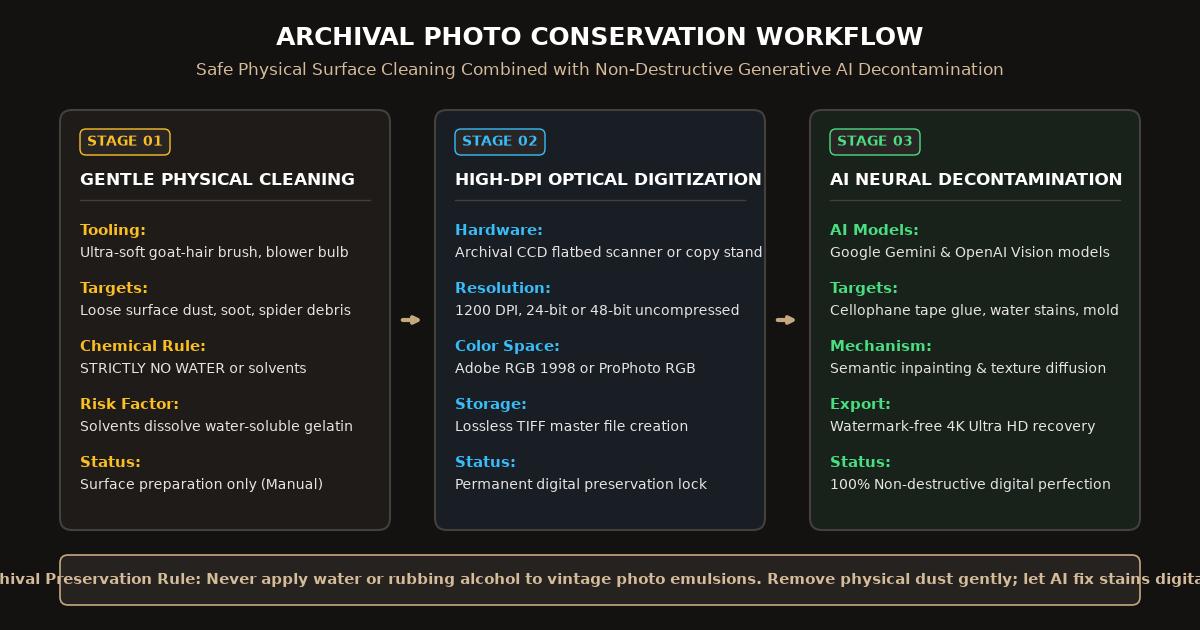
Archival conservation workflow combining safe physical surface dusting with deep AI neural decontamination.
Safe Cleaning Methods: Physical vs. Digital
Before touching an antique print, review which cleaning tasks should be performed on the physical paper versus handled safely in digital software:
| Contaminant | Physical Cleaning Approach | Risk Level | Digital AI Cleaning Approach |
|---|---|---|---|
| Loose surface dust & lint | Soft goat-hair brush or rubber bulb blower | Very Low | Automatic scan dust spot suppression |
| Surface dirt & dry debris | Archival drafting cleaning pad (crumb style) | Low (test edge first) | Semantic texture smoothing |
| Oily fingerprints | Dry microfiber optical cloth; zero liquids | Moderate | Contrast restoration and oil halo removal |
| Flyspecks & insect waste | Digital only; scraping tears emulsion | High (Physical) | Targeted neural inpainting |
| Sticky tape & glue residue | Never peel dry; leave for digital fix | Extreme (Physical) | Generative inpainting replaces missing fiber |
The Essential Physical Photo Cleaning Toolkit
If you plan to clean vintage photographs before digitization, gather these inexpensive archival tools:
- Rubber Bulb Air Blower (Rocket Blower): Uses directed puffs of clean, dry air to blow away abrasive grit without physical contact.
- Ultra-Soft Natural Hair Brush: Clean goat-hair or sable artist brushes gently sweep dust out of textured paper crevices.
- Cotton or Nitrile Archival Gloves: Clean hands still secrete natural skin acids and sebum oils that permanently etch into photographic silver over time. Gloves prevent fresh fingerprint transfers.
- Microfiber Optical Cloth: A dry, lint-free cloth used exclusively for gentle blotting.
What NEVER to Use When Cleaning Old Photographs
Avoid these common household cleaning mistakes at all costs:
- Never Use Water or Windex: Vintage gelatin silver and albumen prints are water-soluble. Liquid cleaners soften the gelatin within five seconds, turning historic portraits into sticky paste that wipes completely off the paper base.
- Never Use Compressed Canned Air: Chemical aerosol dusters can spray bitter cold fluorocarbon propellant liquid, causing thermal shock and freeze-fracturing antique photographic emulsions.
- Never Use Standard Erasers: Pink school erasers and gum erasers leave sulfur residues and drag abrasive rubber across photographic fibers, scratching faces.
Step-by-Step: How to Clean Old Photos Safely
Follow this sequential procedure to clean your collection without risking damage:
1. Blow Away Abrasive Particles
Lay your photograph flat on a clean, dry piece of acid-free blotter paper. Hold your rubber air blower 2 inches from the surface and blow air across the print from the center toward the outer borders. This removes hard sand or grit that would otherwise cause scratches when brushed.
2. Gentle Brush Dusting
Hold your soft goat-hair brush at a shallow 30-degree angle. With minimal hand pressure, lightly sweep the brush across the face of the photograph. Periodically tap the brush bristles against your palm to dislodge accumulated dust.
3. Digitize in High Resolution
Once physical loose dust is removed, place the print on a clean scanner glass. Scan at 600 DPI to 1200 DPI in 24-bit RGB Color. High optical resolution captures genuine silver grain while preventing the scanner light from flattening paper texture.
4. Remove Embedded Grime Digitally with AI
For stubborn stains, yellowed finger grease, and paper discoloration, navigate to the FreePhotoRestoration Free Online Tool:
- Upload your raw scan to the restoration workspace.
- Select Dust, Scratch, and Stain Removal.
- The AI vision engine identifies millions of microscopic specks, distinguishing between photographic subject matter (like freckles or shirt buttons) and unwanted surface dirt.
- Export your restored portrait in 4K Ultra HD (4096px) with crystal-clear facial fidelity.
Storing Your Cleaned Photos Properly
Keep your cleaned physical photographs protected inside archival polyethylene or polypropylene sleeves. Avoid storing photos in unfinished basements or hot attics where humidity fluctuations invite mold and adhesive decay.
Related Guides and Reading
- How to Remove Stains from Old Photographs Safely — Handling water rings, coffee spills, and adhesive tape stains.
- How to Restore Old Photos Online with AI: Complete Guide — Complete workflow from scanning to 4K output.
- Repair Damaged Photos: Creases, Scratches and Tears — Deep structural repair for physically broken prints.
- How to Scan and Digitize Old Photos for AI Restoration — Complete flatbed hardware and smartphone digitizing instructions.