
Few photographic damages look as catastrophic as a physical tear. A family snapshot accidentally torn in half during a move, an antique wedding portrait creased until paper fibers fractured, or an heirloom print with chewed or missing corners often seems lost forever. When faced with separated photo fragments, many people mistakenly attempt to tape them together with standard adhesive tape, only to introduce toxic acids that stain the paper amber over time.
Modern neural vision technology has fundamentally transformed torn photograph restoration. Rather than painstakingly airbrushing torn edges for hours in desktop software, deep-learning inpainting models can seamlessly bridge jagged fracture lines, synthesize missing background patterns, and reconstruct lost facial features with anatomical precision. Below is the complete step-by-step guide to assembling and restoring torn old photos.
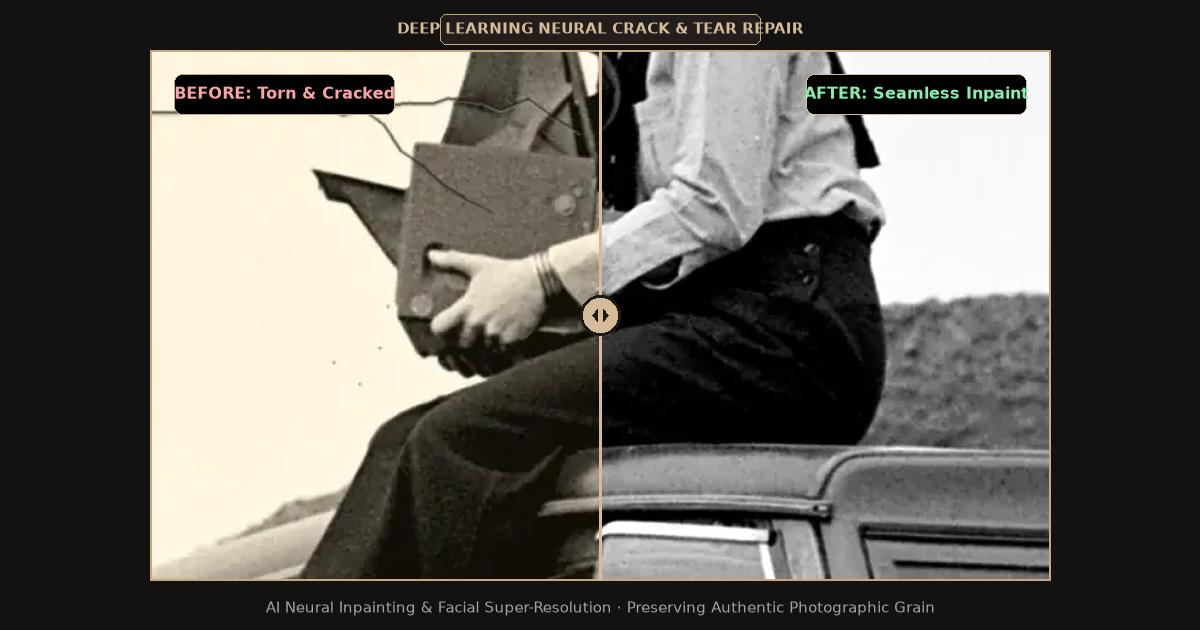
Split-screen comparison showing severe paper tears and cracks repaired through AI neural inpainting.
Comparison: Traditional Manual Retouching vs. AI Torn Photo Repair
Understanding how manual photo restoration compares with neural AI inpainting reveals why modern digital workflows save hours while delivering superior visual consistency:
| Restoration Metric | Traditional Manual Retouching (Photoshop) | Offline Restoration Studio | FreePhotoRestoration AI |
|---|---|---|---|
| Turnaround Time | 3 to 8 hours of manual cloning | 1 to 2 weeks | Under 15 seconds |
| Missing Corner Synthesis | Manual brush texture painting (often looks smudged) | Hand-drawn reconstruction | Neural context-aware texture generation |
| Tear Fracture Seam Visibility | Difficult to eliminate white paper edge fibers | Hand airbrush blending | Automated edge-boundary inpainting |
| Cost | $239/year software subscription | $40 to $120 per photo | Free daily credits |
| Skill Requirement | Professional level digital artist | Professional conservator | Zero learning curve (1-click browser tool) |
Safe Handling: How to Prep Torn Pieces Before Scanning
Before you scan your torn photograph fragments, observe these essential handling rules:
- Never Apply Clear Tape Across the Image Surface: Cellophane and masking tape contain synthetic rubber adhesives that yellow and turn acidic, permanently bonding with photographic silver. If pieces must be secured during scanning, use small pieces of low-tack blue painter tape applied strictly to the blank white paper backing.
- Flatten Gently Without Steam: If torn paper edges are curled or folded over, place the pieces inside an acid-free folder under a flat, heavy book for 24 to 48 hours. Never steam vintage prints with water, which causes gelatin binders to soften and stick to glass.
- Scan All Fragments Together in One High-Resolution Pass: Lay all separated pieces onto your flatbed scanner glass, aligning the jagged fracture contours as closely as possible without overlapping the edges. Overlapping fragments create dark shadow lines that distort digital scans.
Step-by-Step: Restoring Torn Old Photos with AI
Follow this proven workflow to reunite and reconstruct your torn family prints:
1. Digitize in High Resolution (800+ DPI)
- Place the aligned pieces onto your flatbed scanner. Scan in 24-bit RGB Color at 800 DPI to 1200 DPI.
- High optical resolution is critical because it records the exact fiber texture of the paper break, allowing AI algorithms to distinguish between genuine paper edges and background image details.
2. Upload to the Restoration Workspace
Navigate to the FreePhotoRestoration Free Online Tool and upload your high-resolution scan:
- The vision system automatically detects tear fissures, paper crease lines, and areas where emulsion has flaked away.
- Select the Scratch, Crease, and Tear Inpainting pipeline.
3. Automated Seam Elimination and Contextual Inpainting
The neural network performs multi-stage generative synthesis:
- It traces the white exposed paper fibers along the fracture line, matching patterns and color gradients from adjacent intact pixels to bridge the gap invisibly.
- If a corner or piece of clothing is completely missing, the generative model analyzes the symmetrical geometry of the image (such as suit lapels, chair backs, or garden backgrounds) to generate matching contextual details that blend seamlessly into the vintage aesthetic.
- Dynamic range rebalancing eliminates the dark shadows caused by uneven fragment paper heights on the scanner glass.
4. Review and Export in 4K Ultra HD
Inspect the repaired seam at 100% zoom using the interactive before-and-after slider to ensure facial contours, eyes, and hair transitions look perfectly natural. Download your restored master in 4K Ultra HD (4096px).
What to Do with the Physical Torn Original
Once your digital master is restored and safely backed up in cloud storage, protect the physical fragments. Store the pieces flat inside an acid-free archival envelope or between two sheets of archival matboard. Label the outside of the envelope in pencil with family names and dates so future generations handle the delicate fragments with care.
Related Guides and Reading
- Repair Damaged Photos: Creases, Scratches and Tears — Deep dive into fixing physical trauma and silver flake loss.
- How to Restore Old Photos Online with AI: Complete Guide — Master tutorial on facial enhancement and 4K upscaling.
- Online Photo Restoration vs. Photoshop Retouching — Why AI models outperform traditional clone stamps on deep tears.
- How to Scan and Digitize Old Photos for AI Restoration — Avoiding scanner glass shadows on warped paper fragments.