
Restore Old & Damaged Photos Online with AI
Restore old photos with the AI photo restoration tool. Repair scratches, creases, tears, enhance blurry facial details, and colorize black-and-white photos with Google Gemini & OpenAI AI models.
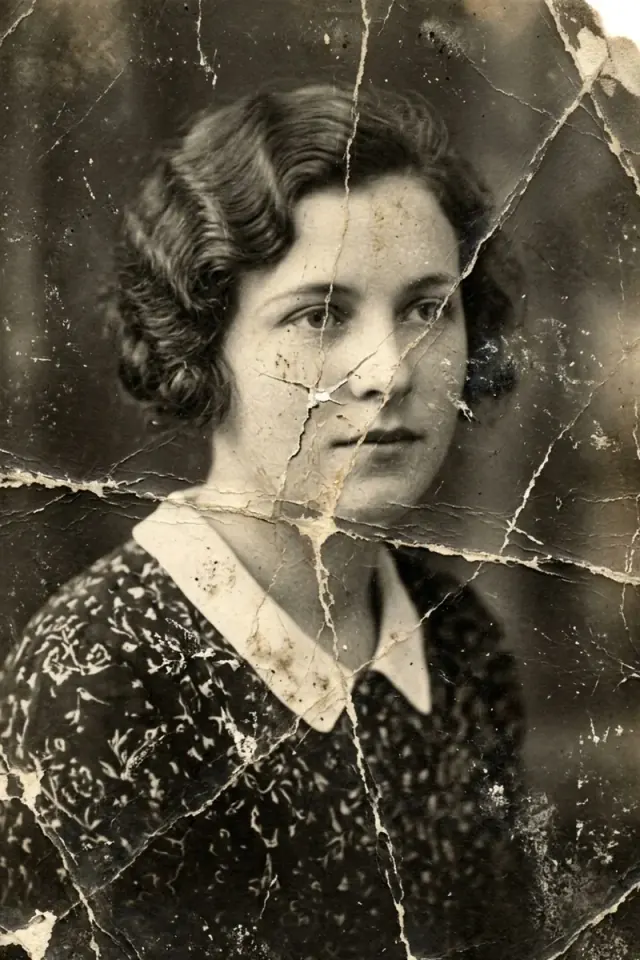
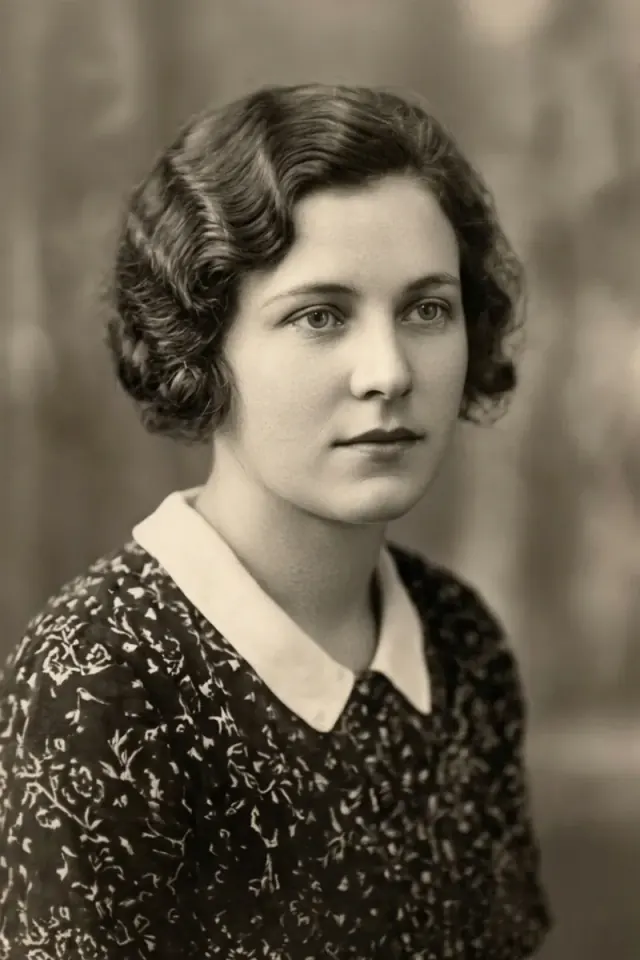
Restore Old Photos: Comprehensive AI Photo Repair & Restoration
Harness cutting-edge deep learning to repair physical damages, sharpen blurry details, and colorize historic family memories.
Photo Repair: Scratches, Tears & Creases
Seamless Damage Inpainting
Intelligently detects and eliminates deep scratches, creases, cracks, dust spots, and torn paper margins.
Preserves Authentic Texture
Blends repaired areas seamlessly into original photographic paper grain without visible brush marks or blur.
AI Face Restoration & Clarity Enhancement
Super-Resolution Facial Reconstruction
Reconstructs out-of-focus eyes, eyelashes, lips, hair strands, and delicate facial contours from blurry vintage prints.
Lifelike Skin Detail
Maintains realistic micro-textures, pores, and natural skin shadows without artificial plastic over-smoothing.
Vintage Photo Colorization: Authentic Palettes
Historical Color Accuracy
Transforms monochrome and sepia photos into vivid full color with historically authentic clothing and environmental hues.
Natural Skin Tones
Applies warm, balanced, and lifelike skin undertones for individuals and multi-person group portraits.
Clarity & Denoise: 2K / 4K Ultra HD Export
Noise & Halftone Suppression
Filters out scanner noise, printing halftone dot grids, and chemical silver halide grain while boosting contrast.
Archival Print Resolution
Upscales restored photos up to 4096px high definition, perfect for museum-grade printing and large frames.
How to Restore Old Photos Online in 3 Simple Steps
Restore, repair, and colorize damaged vintage photos directly in your browser without complex software.
Upload Old Photo
Drag & drop damaged, yellowed, or black-and-white portraits in JPG, PNG, or WebP format.
Select Restoration Focus
Choose All-in-One, Smart Colorization, Face Clarity, or Scratch & Tear Inpainting.
Compare & Download
Slide to compare before and after details, and download crystal-clear 2K/4K photos watermark-free.
Why Choose FreePhotoRestoration for AI Photo Repair?
The ultimate combination of state-of-the-art vision models, user privacy, and zero-learning-curve ease.
Dual SOTA AI Models: Nano Banana 2.1 & GPT-Image-2.5
Leverage Google Gemini Vision and OpenAI models engineered specifically for photorealistic inpainting and facial reconstruction.
Authentic Restoration Without Plastic Artifacts
Unlike basic blur filters, our AI preserves genuine archival fidelity, natural film grain, and realistic expressions.
Zero Installation & 100% Private Cloud Processing
Restore photos on desktop or mobile instantly. Uploaded images are strictly confidential and deleted after processing.
How Our AI Restores Old Photos
What happens after you upload a photo: scratch and tear repair, face enhancement, colorization and export in up to 4K.
Fix Scratches, Creases, Tears and Stains
Manual retouching with a clone tool often leaves blurry patches. Our AI finds creases, cracks, torn edges, water stains and mold spots by itself. It rebuilds the missing parts from the picture around them, so the repair blends in with the original photo.
Sharpen Blurry Faces Without Changing Them
Old portraits are often soft from camera shake or poor focus. The AI brings back detail in the eyes, eyelashes, lips and hair. It keeps each face shape and expression, so your family still looks like themselves, not like a beauty filter.
Natural Color for Black and White Photos
Good colorization is more than filling in shades. The AI looks at clothes, buildings, plants and light in the scene to pick believable colors for the time the photo was taken. Skin tones come out warm and natural instead of flat or gray.
Remove Print Dots and Export in 2K or 4K
Photos scanned from newspapers or books often show dot patterns and moiré lines. The AI removes them and keeps edges sharp. Save the result in Standard (1024px), 2K HD (2048px) or 4K Ultra HD (4096px, with Nano Banana 2.1), large enough for framed prints.
Keep the Look of the Original Print
Heavy noise removal can make old photos look like plastic. Our restoration keeps the natural film grain of the original print. You get a clean, sharp image that still looks like a real photo from its time.
Choose Nano Banana 2.1 or GPT-Image-2.5
You can restore with Nano Banana 2.1, built on Google Gemini, or with GPT-Image-2.5 from OpenAI. Nano Banana 2.1 is best for natural skin tones and color, and supports 4K. GPT-Image-2.5 is best for deep creases, fine scratches and small facial details.
Photo Restoration Pricing & Daily Free Trial
Every account gets 5 free credits each day. Paid plans start at $8.90 per month, and one-time credit packs are valid for 30 days from purchase.
View plansFrequently Asked Questions about Photo Restoration & Photo Repair
Everything you need to know about repairing old photos, colorization, resolution, privacy, and free trials.
How does the AI photo restoration tool repair physical scratches and tears?
Our AI uses deep-learning generative inpainting to analyze undamaged pixels around cracks, tears, and fold lines, reconstructing missing textures and colors naturally without leaving artificial patches.
Can this tool restore and sharpen blurry faces in old portraits?
Yes! The facial restoration module recognizes human facial geometry, recovering sharp eyes, eyelashes, lips, hair strands, and skin contours from faded or out-of-focus vintage pictures.
How does black-and-white photo colorization work?
The AI colorizer identifies historical elements—such as clothing, uniforms, skin tones, skies, and foliage—and infuses realistic, era-accurate colors while respecting authentic lighting.
Can I try it for free?
Yes. Every account receives 5 free credits each day. Free credits reset daily and do not accumulate.
What image formats and resolutions are supported?
We support JPG, PNG, and WebP images up to 20MB. You can export restored images in Standard (1024px), 2K HD (2048px), and 4K Ultra HD (4096px).
Are my private family photos kept secure and confidential?
Absolutely. Your photos are encrypted during upload and processed in an isolated cloud environment. They are never shared publicly or used to train public models.
Do unused subscription credits roll over?
No. Subscription credits do not roll over: each monthly allowance — on monthly plans and on the Annual plan alike — replaces the subscription credits left from the previous month.
Can I cancel or change my plan?
Yes, at any time from your dashboard. Upgrades take effect immediately; downgrades and cancellations take effect at the end of the current billing period, and you keep your plan and credits until then.