
Discovering stubborn stains across irreplaceable family photographs is heartbreaking. Whether it is brownish watermarks from basement humidity, dark mildew spots, accidental coffee drips, or sticky residue left by ancient album cellophane tape, surface stains obscure beloved facial expressions and degrade delicate photographic emulsion.
Because chemical emulsion layers on vintage albumen, gelatin silver, and chromogenic prints are water-soluble and chemically fragile, attempting to wash out stains with household solvents or damp cloths often dissolves the photographic silver completely, causing permanent, irreversible destruction. Below is the definitive archival guide to removing stains safely: combining safe physical surface decontamination with generative AI digital restoration.
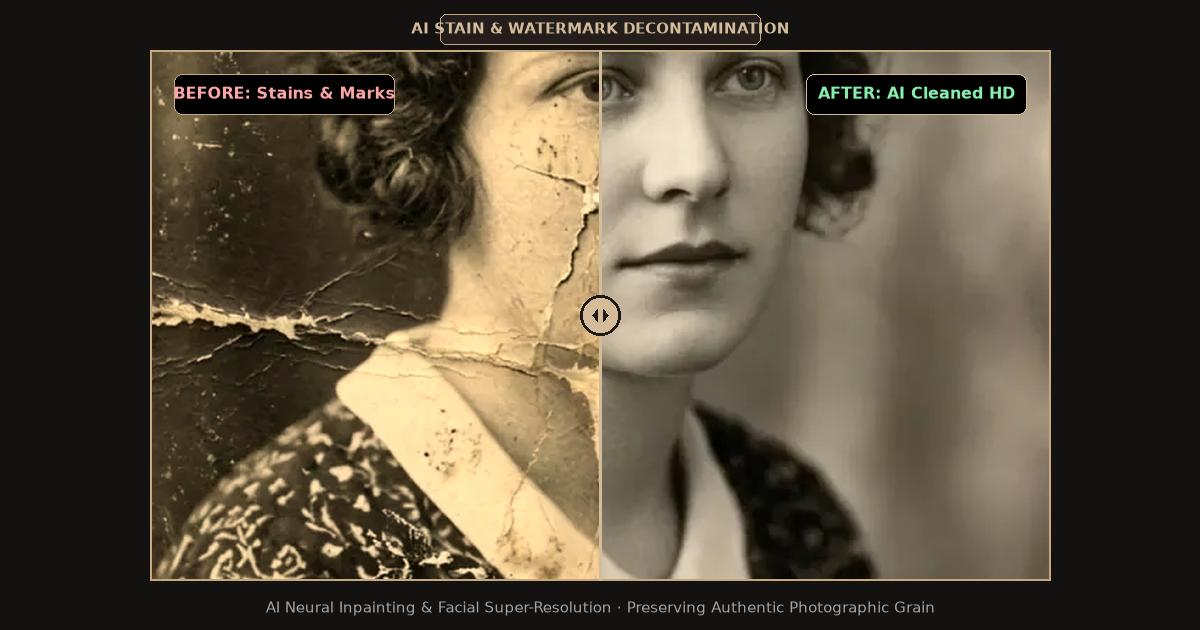
Split-screen comparison showing severe watermarks and stains removed through deep learning AI inpainting.
Diagnostic Matrix: Identifying Photograph Stain Types
Before taking any action, determine the chemical origin of the stain on your vintage print:
| Stain Condition | Visual Presentation | Chemical Root Cause | Safe Removal Method |
|---|---|---|---|
| Water / Mineral Tide Marks | Dark wavy outlines with bleached pale centers | Dissolved salts and redistributed gelatin emulsion | Scan and restore digitally; never re-wet |
| Cellophane Tape Residue | Amber or dark yellow tacky stains, brittle adhesive | Degradation of synthetic rubber adhesive | Archival crepe eraser (physical) + AI inpainting |
| Mold & Foxing Spots | Small reddish-brown or dark speckles across surface | Fungal colonies feeding on gelatin binders | Soft goat-hair brush in dry air + AI cleanup |
| Organic Spills (Coffee, Tea) | Tannin discoloration penetrating paper fibers | Acidic plant compounds binding to cellulose | Scan in high-res 24-bit color; digital restoration |
Critical Archival Rules: What NEVER to Do to Stained Prints
Preserving historic photographs requires understanding physical preservation limits:
- Never Apply Liquid Cleaners or Alcohol: Rubbing alcohol, commercial glass cleaners, and even tap water soften vintage gelatin within seconds. Wiping a wet print lifts the image silver right off the paper base, leaving a blank white tear.
- Never Peel Brittle Adhesive Tape Dry: Attempting to pull old scotch tape off a photograph will rip the top emulsion layer away. If tape remains stuck, professional conservators leave it in place and repair the stain digitally.
- Never Heat the Print with a Hairdryer: Thermal heat bakes organic stains deeper into cellulose fibers and curls the paper backing.
Step-by-Step Guide: Restoring Stained Photographs Digitally
Digital restoration ensures your fragile physical original remains untouched while producing a pristine, publication-grade master file:
1. Digitize with Neutral Lighting
- Gently dust the surface using a dry, soft-bristled artist brush (such as clean goat hair) to remove loose grit that could scratch your scanner glass.
- Place the photograph on a flatbed scanner bed and scan in 24-bit RGB Color at 600 DPI to 1200 DPI. Even for monochrome prints, color scanning records the chromatic difference between yellow-brown stains and black silver tones.
- Save the raw scan in uncompressed TIFF or high-quality PNG format.
2. Upload to the AI Restoration Workspace
Open the FreePhotoRestoration Free Online Tool and select your scanned image file:
- The vision system segments the image into structural layers: human skin, clothing textures, photographic background, and surface damage artifacts.
- Select the Scratch and Stain Inpainting processing mode.
3. Automated Neural Inpainting
The neural vision model executes targeted restoration passes:
- It analyzes clean neighboring pixels to extrapolate correct luminance and tone, eliminating tide lines and tape stains without creating smudged patches.
- Facial landmark detection cross-references underlying bone structure, rebuilding eyes, smiles, and hair obscured by heavy stains.
- The paper base color is normalized, removing yellow oxidation while preserving natural vintage contrast.
4. Inspect and Export in 4K Ultra HD
Use the interactive split slider to verify fine details around eyes, lace collars, and background architectural textures. Download your finished master in 4K Ultra HD (4096px) suitable for museum archiving or high-resolution photo reprints.
Preserving Stained Photos for the Next Century
Once your stained photographs are restored digitally, store the original physical heirlooms in archival polyester (Mylar) or acid-free paper sleeves. Maintain storage temperatures below 68°F (20°C) with relative humidity between 30% and 50% to prevent dormant mold spores from reactivating.
Related Guides and Reading
- How to Restore Water Damaged Photos Online with AI — Specific techniques for dried, stuck, and warped water-damaged prints.
- How to Restore Old Photos Online with AI: Complete Guide — Step-by-step master tutorial on scratch repair and facial reconstruction.
- How to Scan and Digitize Old Photos for AI Restoration — Optimal DPI settings, flatbed calibrations, and smartphone scanning tips.
- Restoring Faded and Yellowed Vintage Photographs — Correcting chemical silver oxidation and UV dye fading.