
Tintypes (ferrotypes) represent some of the most captivating artifacts of early photographic history. Popularized during the American Civil War and continuing into the early 20th century, tintypes are not printed on paper at all. Instead, photographers exposed a collodion emulsion directly onto a thin sheet of lacquered iron. While tintypes were far more durable than fragile glass ambrotypes or daguerreotypes, their unique metallic construction presents severe restoration challenges over a century later.
When inspecting an antique family tintype, you will frequently observe dark, murky exposures, rust flaking where iron sheets have oxidized, spiderweb-like emulsion crazing, and heavy surface scratches from being carried in soldiers’ pockets. Below is the historical conservator’s guide to digitizing and restoring 19th-century tintypes using advanced AI vision models.
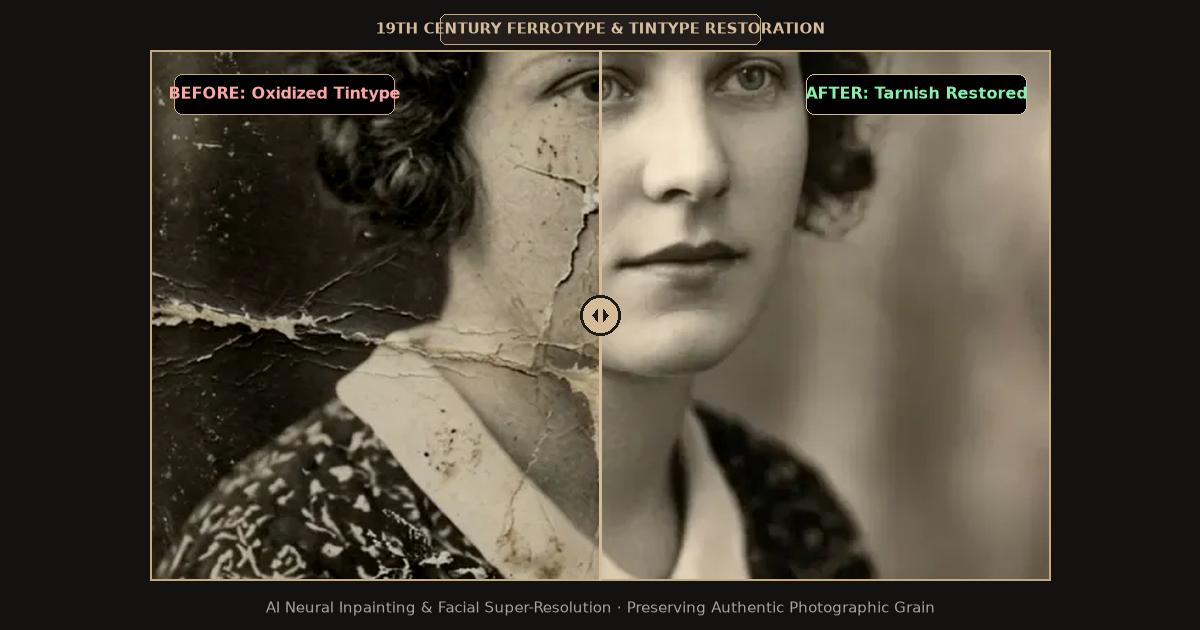
Split-screen comparison showing 19th-century tintype oxidation, dark exposure, and metallic tarnish restored with AI clarity.
The Chemical Anatomy of a 19th-Century Tintype
Understanding how a tintype was manufactured explains why they suffer from distinct degradation patterns compared to modern paper prints:
- Black Lacquered Iron Base: The support base is a thin, rolled sheet of iron coated with black asphaltum or japanning varnish. When moisture or humidity penetrates surface micro-fissures, the underlying iron oxidizes into orange rust, causing the photographic collodion layer above it to bubble, crack, and flake off.
- Wet Collodion Emulsion: The image consists of microscopic particles of reduced metallic silver suspended in nitrocellulose collodion. Collodion is chemically brittle; over decades of temperature shifts, it contracts and forms microscopic cracks resembling cracked porcelain glaze.
- Inherent Underexposure: Because collodion was only sensitive to blue and ultraviolet light, tintype studio portraits required bright sunlight and long exposure times. Most surviving tintypes appear dark, muddy, and nearly impossible to discern under normal room lighting.
Diagnostic Guide: Tintype vs. Daguerreotype vs. Ambrotype
Before scanning, verify your early photographic medium:
| Early Process | Production Era | Base Material | Visual Diagnostic Trait | Restoration Focus |
|---|---|---|---|---|
| Tintype (Ferrotype) | 1856 – 1920s | Lacquered iron metal sheet | Magnetic; non-reflective; image reversed | Dynamic range lift, rust inpainting, scratch repair |
| Ambrotype | 1854 – 1865 | Clear glass plate with black backing | Translucent if backing is removed | Glass crack repair, black velvet backing re-anchoring |
| Daguerreotype | 1839 – 1860 | Silver-plated polished copper sheet | Mirror-like surface; image shifts positive to negative | Glare removal, tarnish cleanup, micro-polish contrast |
Scanning a Tintype Without Harsh Metallic Glare
Digitizing an antique metal photograph requires careful scanner settings to avoid blown-out specular highlights:
- Use a Flatbed Scanner with CCD Sensor: Inexpensive CIS (Contact Image Sensor) scanners struggle with the focal depth of bent metal plates. A CCD flatbed scanner provides superior depth of field.
- Scan at 1200 DPI in 24-bit RGB Color: High optical resolution allows the AI to differentiate between intentional hand-tinted rouge on cheekbones and accidental rust speckles. Color scanning is essential to record the chromatic difference between silver emulsion and orange iron oxide.
- Never Clean with Metal Polish or Water: Applying brass cleaner or water dissolves the nitrocellulose collodion instantly, destroying the image irreversibly.
Step-by-Step: AI Restoration of Antique Tintypes
Follow this tested digital pipeline to restore luminous clarity to your antique portraits:
1. Digitize and Orient Your Scan
Save your raw scan in uncompressed TIFF or PNG format. Because most tintypes were direct-positive camera exposures, the subject is horizontally mirrored. You may choose to keep the historical orientation or flip the image horizontally in your software.
2. Upload to the Online Restoration Workspace
Open the FreePhotoRestoration Free Online Tool and upload your tintype scan:
- Select the Antique & Historical Portrait pipeline.
- The vision system inspects the image histogram, identifying severe collodion shadow crush and rust flaking.
3. Neural Dynamic Range Recovery and Face Reconstruction
The AI executes targeted deep-learning processing:
- Shadow Illuminance Expansion: The engine lifts dark collodion shadows by up to 4 exposure stops, revealing intricate details in Civil War wool uniforms, brass buttons, Victorian lace dresses, and hairstyle textures that were completely invisible to the naked eye.
- Rust and Pitting Elimination: Generative inpainting detects orange-brown oxidation spots and mechanical scratches, bridging the damaged areas using surrounding intact emulsion grain.
- Facial Detail Synthesis: Deep facial landmark models restore iris definition, eye catchlights, and lip contours without altering the genuine historical appearance of the ancestor.
4. Optional Historical Colorization
Tintypes were occasionally hand-tinted in the 1860s with subtle pink rouge on the cheeks and gold leaf on jewelry. Selecting the Smart Historical Colorization mode applies natural period-accurate flesh tones, deep wool blues, and brass lusters while respecting Victorian color palettes.
5. Export in 4K Ultra HD
Download your finished tintype restoration in 4K Ultra HD (4096px), ready for high-resolution canvas printing or archival family history book publication.
Preserving the Physical Metal Antique
Store antique tintypes in individual acid-free archival enclosures inside a climate-controlled room. Never store metal photographs in vinyl sleeves, which release acidic plasticizers that accelerate iron corrosion.
Related Guides and Reading
- Antique Family Photo Restoration: Preserving 19th & Early 20th Century Heirlooms — Historical preservation techniques for Victorian prints.
- How to Restore Faded and Yellowed Old Photos with AI — Correcting chemical silver oxidation and UV dye fading.
- Unblur Face in Old Photos: AI Facial Reconstruction Guide — Reconstructing facial details and eyes in soft vintage portraits.
- How to Scan and Digitize Old Photos for AI Restoration — Hardware recommendations for scanning antique media.