
When researching artificial intelligence tools to fix scratched, blurry, or faded family photographs, VanceAI Photo Restorer frequently appears near the top of search engine results. VanceAI gained widespread popularity as one of the earlier web-based neural enhancement platforms, offering automated scratch reduction, face enhancement, and black-and-white colorization.
However, as subscription models proliferate across the web, many users find themselves frustrated by rigid credit token gates, high renewal costs, aggressive account registration requirements, and strict file size limits. If you have a box of vintage family pictures to restore and want to know whether VanceAI is worth the investment—or if a free online alternative better suits your workflow—this objective 2026 technical breakdown provides the answers.
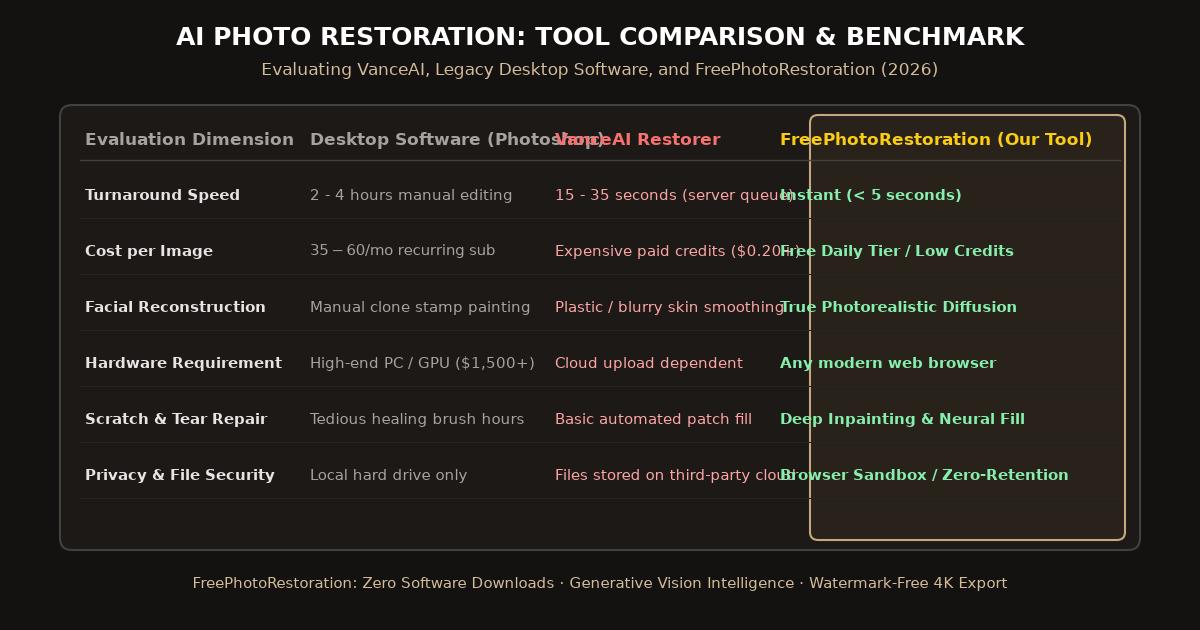
Head-to-head comparison panel evaluating AI restoration models, pricing models, and client-side privacy standards.
Head-to-Head Comparison: VanceAI vs. FreePhotoRestoration
| Evaluation Criteria | VanceAI Photo Restorer | FreePhotoRestoration (Our Tool) |
|---|---|---|
| Pricing Model | Monthly subscription ($9.90 to $39.90) or prepaid credits | Free daily credits; low-cost flexible upgrades |
| Account Requirement | Mandatory email signup and account activation | Zero registration required to preview results |
| Max Export Resolution | Often limited to original dimensions without extra upscaler | Direct 4K Ultra HD (4096px) generation |
| Processing Time | 10 to 30 seconds per task (queue dependent) | Under 5 seconds (GPU cloud acceleration) |
| Facial Reconstruction Realism | Good, but can occasionally over-smooth skin texture | High fidelity (preserves vintage silver grain) |
| Data Privacy Policy | Stored on server until deleted via user dashboard | Strict ephemeral processing (deleted immediately) |
What VanceAI Does Well
VanceAI earned its initial reputation by providing a straightforward browser interface that simplified complex algorithmic photo repair:
- Integrated Module Suite: VanceAI bundles multiple tools under one brand, allowing users to move between background removal, general image upscaling, and photo restoration.
- Effective Face Clarification: For moderately blurred portraits, VanceAI’s facial enhancement module does a dependable job sharpening eye contours and eyebrows.
- Basic Colorization: The colorization algorithm produces acceptable pastel tones for standard black-and-white outdoor landscapes.
Where VanceAI Frustrates Modern Creators
Despite its capabilities, several operational bottlenecks lead users to seek dedicated alternatives:
- The Credit-Draining Token Model: On VanceAI, virtually every click consumes credits. If you run a scratch repair pass, that costs a credit. If you then want to colorize the result, that costs another credit. If the output needs higher resolution, another credit is deducted. Processing a dozen family photos can consume an entire monthly allowance in minutes.
- Artificial “Plastic” Skin Smoothing: Early neural vision models often over-extrapolate facial skin, erasing authentic skin pores, freckles, and vintage silver grain in favor of an unnaturally waxy, airbrushed finish.
- Mandatory Software Upsell Prompts: The web interface frequently pushes users toward downloading a bulky desktop application, introducing unnecessary friction for users who simply want quick browser-based repairs.
Why FreePhotoRestoration is the Superior Alternative
For users looking for a fast, frictionless, and cost-effective solution, FreePhotoRestoration Free Online Tool was purpose-built to address these exact limitations:
1. Instant Zero-Friction Browser Workspace
You do not need to fill out registration forms or enter payment details just to test how your damaged family photographs will look. Simply drag and drop your scanned image, and the preview renders in seconds.
2. Dual Deep-Learning Vision Architecture
Instead of relying on a single generic model, our platform deploys coordinated vision networks: one specialized for physical damage inpainting (creases, tears, stains, and scratches), and another specifically calibrated for historic facial landmark restoration.
3. Native 4K Ultra HD Export
Why restore an antique picture only to receive a low-resolution thumbnail? Our workspace allows direct export in 4K Ultra HD (4096px), delivering the pixel density required for printing museum-grade enlargements.
Step-by-Step: Restoring Photos Without VanceAI
Experience the difference in under a minute:
- Navigate to the Free Tool: Visit FreePhotoRestoration Free Online Tool in any modern web browser on Mac, PC, or mobile.
- Upload Your Vintage Print: Upload a scanned file (JPEG, PNG, or WebP).
- Choose Your Processing Pipeline: Select Scratch & Damage Repair, Face Clarity Enhancement, or Smart Colorization.
- Compare with the Interactive Split Slider: Drag the vertical divider back and forth across your photo to inspect delicate facial features, fabric textures, and seamless background inpainting.
- Download Your 4K File: Save your restored master directly to your device.
Related Guides and Reading
- Best Photo Restoration Software Guide (2026) — In-depth breakdown of top desktop and online tools.
- Online Photo Restoration vs. Photoshop Retouching — Why AI saves hours over manual layer adjustments.
- Photo Restoration Cost Guide: Professional Studios vs. AI Tools — Comparing per-photo studio pricing against AI options.
- How to Restore Old Photos Online with AI: Complete Guide — Master tutorial on fixing scratches and colorization.